The Google Analytics you know is coming to an end!
Learn how to adapt to the new generation of the tool
If you have a website, Google Analytics is one of your main allies. After all, it is through it that you can analyze data and monitor all events involving your pages. The original version of Google Analytics, called Universal, was created 18 years ago. In 2020, Google announced the transition to Google Analytics 4, or GA4 for short.
Indeed, the era of Universal Analytics is numbered. After all, by July 2023, all Analytics properties must migrate to GA4.
Are you prepared for this change?
Next, we will explain a bit more about what changes with Google Analytics 4, how it impacts what you are already used to, and what needs to be done to use the new version of the tool. But, we already give you a heads up: there are many new features and details that deserve attention. Shall we?

What is Google Analytics?
Well, before we talk about the fourth generation of Google Analytics, it's worth recalling some information about Google's data analysis tool. The Universal version of Google Analytics, which is currently used, was created in 2005.
It is a free tool used by websites worldwide to analyze metrics and access data. There is also a paid version, Google Analytics 360, with advanced features aimed at large companies.
How does Google Analytics work?
The tool is one of the main allies for anyone with a website, as it provides relevant data about access. This occurs through the use of code that tracks this flow. Once installed, it automatically starts collecting valuable information about visitors.
Thus, it is possible to know where the accesses came from, the pages visited, time spent, and conversions made. The Google Analytics 4 tool also shows the device used by the visitor and the keywords that led them to the site.
Important for decision-making
With this data in hand, the company's digital marketing team can make decisions based on comprehensive and in-depth reports. This enables the construction of a strategy that is truly relevant to the business. And, of course, it helps in creating ad campaigns through Google Ads.
By the way, you will see that Google Analytics 4 is even more integrated with Google's advertising platform.
What is Google Analytics 4?
You might be wondering what Google Analytics 4 is, right? Well, it is the new version of the monitoring and measurement tool. It was introduced in a beta version back in 2019. In 2020, it was announced as the successor to the traditional version. Now, the final deadline for migration is approaching.
Mark your calendar:
Users of Google Analytics Universal have until July 1, 2023, to switch their account. For companies using paid accounts of Google Analytics 360, the deadline is October 1, 2023. Until these dates, Universal Analytics will continue to collect data, but afterwards it will be phased out.
Therefore, it is important to start the migration process as soon as possible to get used to the new features of the tool.
For your information…
Website administrators and digital marketing agencies will still have access to Universal Analytics to view historical data for six months from the platform's shutdown date. However, the new data collected will only be available in Google Analytics 4.
Thus, by the end of 2023, the Universal version will indeed be finished, and all its data will be extinct. In fact, Google advises its users to export their Universal Analytics property data.
Need help migrating to Google Analytics 4? Talk to our specialists now!

What changes with Google Analytics 4?
The fourth generation of the tool comes with many new features, from its interface to the functionalities it offers. One of the major differences is the complete focus on the event-driven data model.
The Google Analytics 4 tool has also gained new measurement metrics, which will allow different ways of exploring, visualizing, and analyzing data. In other words, there is a lot to update, right?
To better understand the new features of Google Analytics 4, we have broken down some of its main points. Check it out!
Events in Google Analytics 4
In Universal, as Google itself states, events were considered "user interactions measured independently of a web page or screen loading." Thus, clicks on links, downloads, form submissions, and video plays were considered events.
With GA4, Google states that events are considered interactions with a website or apps, measured simultaneously or independently of a page or screen loading. Now, "events include page views, button clicks, user actions, and system events."
In Google Analytics 4, data collection is automatic and includes everything from page scrolling, exit clicks, user engagement with media on the site, and other actions.
Data privacy
GA4 comes with an even more powerful solution for protecting user data. Thus, security and privacy become paramount during the use of the tool. Google Analytics 4 uses data modeling through machine learning.
Therefore, it is not necessary to use cookies for data collection. The tool has also stopped storing IPs and strictly follows the General Data Protection Law (LGPD).
New cross-platform structure
Previously, Google Universal was separated into Account, Property, and View. In the update, the tool now has Account, Property, and Data Stream. This means that it will now be possible to measure not only the website but also its apps on Android and iOS. Or even the flow between a website and an app.
That said, it becomes easier to understand why Google Analytics 4 considers itself a cross-platform tool, right? But, you should know that GA4 needs Firebase to work with applications. It is a Google tool focused on app analysis, so to achieve this flow, it will be necessary to create an account there.
Behavior trends
Google Analytics 4 uses machine learning resources to create detailed insights about behavior trends. This means that the system is capable of predicting the behavior of a group of users.
With this, you and your marketing team can develop strategies based on data, increasing the chances of conversion.
Maximum integration with Google Ads
You know that Google Analytics is essential for a successful Google Ads campaign, right? But, with GA4, this has been immensely deepened. Now the tool allows you to create custom audiences, considering how they interact with your site.
Even conversions resulting from viewing an ad on YouTube can be deeply analyzed with Google Analytics 4.
These are some significant changes in the new tool, but when you migrate your account, you will notice that many other things have changed. To ensure the best use of the available resources, count on our Analytics specialists!
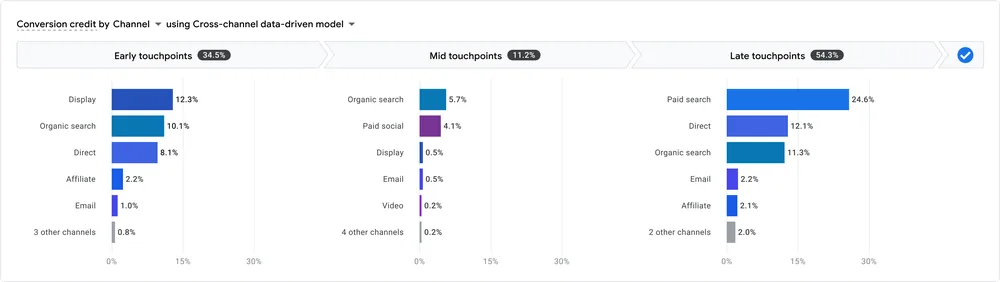
Now, it's time for you to learn about the 10 metrics of Google Analytics. These are new parameters used by the tool that promise even deeper and more comprehensive measurements.
10 metrics of Google Analytics 4
Thinking about improving the website owner's understanding of metrics, Google Analytics 4 now features exclusive new metrics. Get to know them all:
1. Users and new users
This metric was already used in the previous version and remains in Google Analytics 4. Basically, they represent the unique visitors who arrived at the site in a given period. And the visitors who entered the site for the first time. Simple, right?
2. Sessions
Here, some doubts may arise even among marketing professionals. This is because the old Analytics also used the term "sessions" for one of its metrics, but in Google Analytics 4, this is measured differently.
As GA4 focuses on events, the metric is derived from one of them. Thus, a session begins as soon as the visitor performs one of these actions: a) opens the website or app in the foreground; b) views your site without being connected to a previous session.
3. Engaged sessions
This is a new metric aimed at removing rejections from the session count. To do this, an engaged session is valid after the user remains for at least 10 seconds with the website or app open in the foreground.
If the user exits before this time, then GA4 will count it as a rejection. This is interesting because the tool starts to count the moments when the user is genuinely using the site in the foreground.
Additionally, it is also possible to calculate engaged sessions per user, revealing how many visits with interactions were made by the visitor.
4. Engagement rate
The engagement rate is calculated by Google Analytics 4 based on the relationship between sessions and engaged sessions. It represents how much your site or app encourages users to navigate the page or screen, remaining active for longer.
If the engagement rate is low, you can think about improving the content or even other strategies that encourage visitors to access other pages.
5. Average engagement time
This metric is essential for evaluating how much time each visitor spends on your site. Based on the results, it is possible to identify whether the pages or screens are, in fact, attractive enough to engage internet users.
6. Event count
Interactions on the site are related to events, which have become fundamental for Google Analytics 4. Now, the tool offers an Engagement function that details for the owner all activities, according to the desired settings. These can include: page scrolling, page views, exit clicks, or other custom items.
In summary, the event count relates to how many actions were performed by users.
7. Conversions
Still in the Engagement tab, the site administrator has access to the conversions that were made. In other words, Google Analytics 4 provides a report of the conversion events that were actually carried out by the visitor.
8. User retention
Very important for the site, user retention refers to visitors who arrived at the page and continued consuming your content. Thus, Google Analytics 4 provides a metric that evaluates the percentage of new user retention, indicating how many of them return to the site in the following days.
9. Revenue
GA4 provides a monetization report that allows the administrator to track in real-time the revenue generated by the site. This can include sales on e-commerce, app purchases, purchases of e-books, among others.
10. Lifetime value
The last metric of Google Analytics 4 that you need to know is the lifetime value in the app. With it, you understand the behavior of the app user, measuring their activities on the screens.
For example, GA4 sums all events performed by the user during the first 120 days of app use, accounting for purchases and other elements.
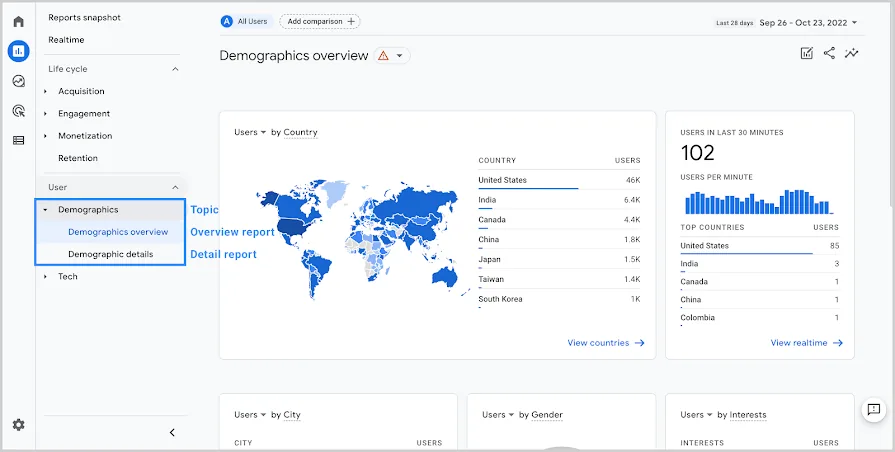
Want to know how to analyze your site's metrics? Count on Kaizen, we can help you!
How to activate an account in Google Analytics 4?
If you've made it this far, you certainly understand the importance of migrating your account to Google Analytics 4, right? In fact, this has become a requirement, and as we have seen, the deadline is running out. But before you start creating accounts everywhere, it's worth checking if your property will indeed be excluded.
How to find out if you need to migrate?
If you created your property after the end of 2020, it is very likely that you are already using GA4. So, you won't need to migrate, as your platform is already updated.
For users who created properties before October 14, 2020, the change will likely be necessary, as accounts were created from the old Google Analytics Universal during that period.
If this is your case, Google has developed a setup assistant that promises to help with the migration of the property. To understand better, you can click here and follow the general guidelines.
Remember to export old data
As we mentioned earlier, after July 1, 2023, the old data from Google Analytics Universal will be available for export only until the end of the year. So, don't forget about that, okay?

Success case
Meet the Brazilian companies that use Google Analytics 4 in their campaigns
If you are a bit scared of all the changes that are coming, we are here to try to ease your mind. Therefore, we have separated this very interesting news that shows how two major Brazilian companies converted more sales by measuring their campaigns using Google Analytics 4.
Learn how Tim and BTG used GA4 in their campaigns by clicking here
Need help with your company's analytics? Here at Kaizen, our team of specialists is ready to assist you in migrating to Google Analytics 4.
About Kaizen:
Kaizen is a full-service digital agency focused on each client's objectives. With over 20 years of experience in the digital market and a specialized team in creating online strategies to generate good results. Among our main services are: lead generation, inbound marketing, and performance for retail, industry, and services.
We are pioneers in the Brazilian market with our own lead generation and monitoring system, SEO, easy-access media management, and the implementation of the KAIZEN Method of continuous improvement. Combined with this philosophy in all areas of operation, our team applies Lean Canvas and Growth Hacking processes so that, based on data analysis, it is possible to create experiments and achieve the desired results.
Transform your digital presence!
Get in touch and let's discover the best solutions for your company together!