

Learn how to use YouTube Analytics statistics to optimize your video content
With over 2.5 billion active users monthly worldwide, including 142 million in Brazil alone, YouTube is the largest video-sharing platform on the internet. Since its launch in February 2005, the site has been one of the most popular tools for creating and sharing content in video format. Thus, with the rise of digital marketing, YouTube has also become an effective advertising platform for brand and business strategies.
However, creating successful videos on YouTube is not an easy task. In fact, many content creators have questions regarding YouTube Analytics metrics. After all, it is not enough to create an attractive video for your results to be positive. First and foremost, the content creator must analyze how the tool works, understand its metrics, and evaluate audience behavior. This way, it is possible to improve the videos and reach a qualified audience.

What is YouTube Analytics?
YouTube Analytics is a powerful tool that helps understand the performance of videos on the platform. Its relevance can be compared to Google Analytics. It provides a comprehensive view of all YouTube metrics that help content creators make smart decisions to improve the quality and reach of their videos.
Daily, the tool provides updated reports for its users. In these reports, it is possible to view precise data about traffic on the YouTube channel, such as source, demographic information about the audience, subscribers, number of comments, likes, shares, and even understand the watch time of the videos.
In other words, with YouTube Analytics, it is possible to know how long a visitor stayed watching the published content. And this makes all the difference in the reach of the publication.

What are the metrics of YouTube Analytics for?
Understanding YouTube metrics is essential for companies and content creators who want to optimize their published materials. These statistics simplify the process of knowing the audience profile, understanding what they like, and thus improving the results of the YouTube channel.
After all, it is pointless to produce high-quality content if it does not appeal to the audience. With the metrics provided by the platform, it is possible to improve video performance and optimize content according to the formats that attract the audience the most.
Based on the data provided by YouTube Analytics, it becomes easier to make assertive decisions. This is because they are based on concrete information rather than guesses or assumptions that could harm the business's performance online.
How to view YouTube Analytics statistics?
First of all, it is important to know that YouTube Analytics statistics are only available to users who have a channel on the platform – with at least one video published. That said, simply open the YouTube homepage, click on your avatar to open the options menu. In it, select YouTube Studio and then Statistics/Analytics.
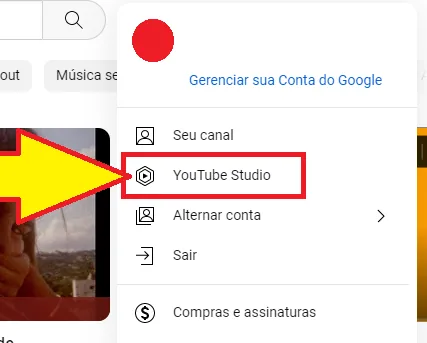
Once done, all information is made available to the user, who will be able to understand in a simple and efficient way a little more about their channel's performance on YouTube. Among the statistics shown, it is possible to check views, watch time in hours, number of subscribers, and much more.
To better understand what each of these YouTube metrics represents, just continue reading.
Views
The most basic metric of YouTube Analytics is the number of views. This metric shows how many times your video has been viewed by YouTube users. Views are counted when a user watches your video for at least 30 seconds or when the video is watched completely. If a user watches the video multiple times, each view is counted.
It is possible to view the number in real-time, as well as see how many views the videos received in the last 48 hours and also see the number of views that the YouTube channel itself received.
Attention!
Although the number of views may seem like a success indicator in YouTube Analytics, it is important to remember that it is not the only important metric. It is possible to have many views but few actions (such as channel subscriptions or engagement), which may indicate that your content is not as effective as it could be.
View retention rate
The view retention rate of YouTube Analytics measures the percentage of people who watched your video up to a certain point. Basically, it reveals the average duration of views of the videos. This helps to understand if visitors are watching the content until the end or closing the page before it finishes.
For example, if you have a five-minute video and the view retention rate is 50% at two minutes, it means that half of the viewers watched the video completely and the other half stopped watching before the two minutes.
This is one of the most important metrics of YouTube Analytics, as it helps to understand how your audience is responding to your content. It is estimated that the ideal retention rate is at least 50%. After all, if this rate is much lower, it means that the content is not interesting to the audience.
It is also worth noting that the YouTube Analytics algorithm uses the view retention rate to recommend your videos to other users. Thus, a high rate increases the likelihood of recommendation, allowing the video to be easily found on the platform.

Tip!
By knowing when viewers lose interest, you can adjust the content to keep the audience engaged for longer. Additionally, the view retention rate can also help you understand if the format of your video is working.
Engagement
The engagement metric measures the audience's interaction with the video, such as likes, comments, shares, and subscriptions to the YouTube channel. Engagement is important because it shows that your content is generating an active response from viewers.
By increasing engagement, you increase the chance of your video being recommended by the YouTube Analytics algorithm. Thus, it can be seen by a larger audience. Furthermore, engagement can provide valuable feedback on what your audience thinks about the videos published on the YouTube channel.
To know…
Not all engagement is equally valuable for YouTube Analytics. Just like on other social networks, comments and shares are considered more valuable than likes. After all, they indicate that the user is engaging in a conversation and sharing the content with others.
Traffic source
The YouTube Analytics metric that details the traffic source on the channel shows where viewers are coming from. This includes YouTube itself, external websites, social networks, and more. By understanding where the audience comes from, it is possible to adjust the video promotion strategy to reach more people.
Among the most common traffic sources are: YouTube Ads, suggested videos, external links, YouTube search by keywords, YouTube playlists, or even links published on Facebook or Instagram, as well as shares via WhatsApp and others.
Number of subscribers
This allows you to analyze the number of subscribers on the YouTube channel and understand the variation over time. With this, it is possible to check both the increase in the number of people subscribed to the channel and a possible decline.
Impressions
Impressions reveal the number of times video thumbnails have been displayed to YouTube visitors. Related to this, we also have the Click-Through Rate of Impressions, which represents the frequency with which users clicked on the thumbnail to watch the video.
Audience
As important as knowing the previous data is understanding who the user accessing the YouTube channel is. Therefore, the Audience metric reveals interesting data, such as the percentage of subscribed and non-subscribed visitors, main subtitle languages, age and gender, location, and more.
Frequently asked questions about YouTube Analytics metrics
Do "Like"/"Dislike" ratings affect video recommendations?
In a way. The "Like" and "Dislike" ratings are some of the signals that YouTube considers for ranking. The recommendation system determines whether viewers choose to watch a video or not. The system recognizes how long the viewer spent watching the video and whether they are satisfied. The overall performance of the video is determined by a combination of these factors.
How to optimize a title and thumbnail for discovery?
1) Check if the thumbnail follows the YouTube policy
2) Use titles that grab attention and accurately represent the content of the videos
3) Create thumbnails that accurately represent the content
4) Avoid using misleading, sensationalist, or clickbait titles and thumbnails. These methods can deter potential new viewers from the YouTube channel. They can also result in the video being reported, which decreases the likelihood of it being recommended to new viewers.
Why do I have more views than impressions on the YouTube Analytics dashboard?
If a large flow of traffic to your video comes from outside YouTube, you will have more views than impressions. An impression is not counted every time a viewer sees a video thumbnail. Additionally, not all views come from thumbnail impressions.
Do you evaluate the metrics of your YouTube channel?
As we saw in this article, YouTube Analytics metrics provide valuable information about how content is being received by the audience. This allows understanding how a content creator can improve their video promotion strategy.
By understanding and regularly monitoring YouTube Analytics metrics, you can adjust your strategy to reach a larger audience and increase engagement and revenue generated.
To stay updated on more interesting content about the digital universe, just keep following the Kaizen blog! Oh, don't forget to follow our profile on Instagram! 😉