

Do you know the relationship between Core Web Vitals and SEO? Discover in this article how to use Google's metrics
We already know that one of Google's priorities is the constant search for improvements in user experience on the web. Within this goal, Core Web Vitals are an interesting example and need to be considered in a good digital marketing and SEO strategy.
Launched in 2020, Google's metrics evaluate the quality of user experience across all websites available on the web. Moreover, they represent a ranking factor in the results of the most used search engine in the world. Because of this, they must be meticulously analyzed by website administrators and developers.
Although they are so important, some people still do not know what Core Web Vitals are and how they work. In this article, you will understand how to use them alongside your SEO strategy to optimize your site and ensure a good ranking on Google.

What are Core Web Vitals?
Core Web Vitals are a set of metrics created by Google to measure the quality of user experience on a website. In translation, they can be understood as "Google's Vital Principles," but they are also referred to as "Main Web Metrics."
They are part of a Google update called Page Experience which, as the name suggests, uses algorithms focused on user experience. Because of this, Core Web Vitals are important for SEO strategies, as they help optimize the site and improve its ranking on the results page.
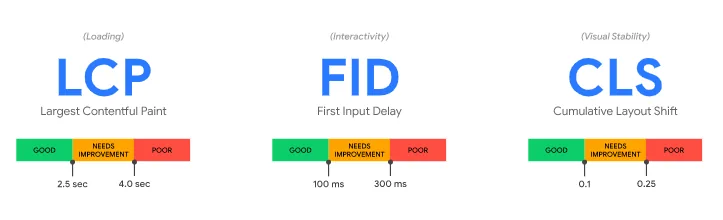
The Core Web Vitals consist of three indices based on loading, responsiveness, and stability. Provenly, they help improve page rankings in the SERP through analysis and monitoring of website performance. The goal is to provide an increasingly better user experience.
Brief summary of Google's metrics. Later, you will understand each of them in a more in-depth way.
Largest Contentful Paint (LCP): measures the time it takes for the content on a page to load, meaning it relates to loading speed. This element can be an image, video, or block of text, for example.
First Input Delay (FID): measures the time it takes for the page to respond to a user interaction, such as clicking a button or link.
Cumulative Layout Shift (CLS): measures the visual stability of the page, meaning how much its elements move while it is loading. If elements suddenly change position, it can be confusing for the user.
As you can see, each of the metrics above relates to a specific aspect of the site. If any of them are inadequate, the user experience is negatively affected, hindering navigability and conversions.
After all, for Google, "optimizing the quality of user experience is the key to long-term success for any website on the web".
Why are Google's metrics important?
Core Web Vitals are important because they affect the user experience on a website. If a page takes too long to load or responds slowly to a visitor's interaction, it can lead to frustration and cause the user to leave the site.
On the other hand, if a page loads quickly and responds promptly to interactions, it can enhance their experience and increase the likelihood that they will continue browsing the site. It encourages opening new tabs and time spent on the site.
Additionally, they are used as a ranking factor in Google's search results. This means that if the site does not meet the Core Web Vitals metrics, it may receive a low ranking in the search results of the search engine.

How are Core Web Vitals measured?
Core Web Vitals are measured using performance monitoring tools. Among them are Google PageSpeed Insights, Lighthouse, and Chrome DevTools. These tools provide detailed information about a website's performance, including Core Web Vitals metrics.
To measure them, however, it is necessary to use one of these tools and analyze the metrics for each page of the site. This helps identify which pages need to be optimized and where improvement efforts should be concentrated.
Unraveling Core Web Vitals metrics
See in detail what each of Google's metrics represents and learn how to use it to your advantage.
LCP: Largest Contentful Paint
Translated as Largest Contentful Paint, LCP is used to measure the loading time of the site. Its focus is on the loading speed of the largest element on the site, whether it be video, image, or text, as it considers it the main content of the page.
According to Google, for the site to perform well, the ideal is for LCP to occur within 2.5 seconds. An LCP over 4 seconds is considered poor, and sites with loading times between 2.5 and 4 seconds require improvements.
FID: First Input Delay
The First Input Delay measures the page's ability to respond to a user action. In other words, this metric measures the page's response time to interactions, such as clicking a link or downloading content. Thus, we can say that FID focuses on interactivity, and the more agile the site is, the better its performance with users.
Google recommends that FID occur within 0.1 seconds, and for sites that exceed 0.3 seconds, urgent improvements are recommended.
CLS: Cumulative Layout Shift
Translated as Cumulative Layout Shift, CLS evaluates sudden changes in the site's layout, such as pop-ups or images that overlap links or forms. If this occurs, the user experience is harmed, and due to the lack of stability, Google ends up lowering the site's score.
If the site's CLS is scored at 0.1 or below, Google considers it to perform well in this regard. A CLS above 0.25 requires adjustments and adaptations of the page.
How to optimize the site for Google's metrics?
Now that you know what Core Web Vitals are, it's time to discover how to optimize the site to meet the metrics' requirements. Here are some tips:
1. Improve the site's loading speed
To improve LCP performance, ensure that images, videos, and other heavy content elements are optimized for the web, reducing server response time. Consider using techniques such as lazy loading of images to ensure they are displayed quickly.
2. Reduce the page response time
To improve FID performance, reduce the page response time, especially for actions that require user interaction, such as clicking buttons and links. Implementing improvements in the site's code and reducing the number of user requests can be beneficial.
3. Avoid unexpected changes in the page layout
To improve CLS performance, avoid unexpected changes in the page layout, such as elements moving while the page is loading. Ensure that all elements have fixed dimensions and avoid using ads or pop-ups that may alter the original layout.
4. Use quality hosting
To ensure overall good performance, use quality hosting with fast loading speeds and reliable uptime.
5. Use an optimized theme
If you use a CMS (Content Management System) like WordPress, choose a theme optimized for Core Web Vitals metrics. This allows the site to be optimized for performance metrics.
What is the relationship between Core Web Vitals and SEO strategies?
With the Page Experience update, Core Web Vitals metrics were implemented to enhance user experience on a website. They help improve navigability, making the site more responsive and user-friendly. Automatically, this improves SEO, increases traffic, and results in a higher number of conversions.
However, as Google itself emphasized in its official statement, even if the page experience is satisfactory, it does not replace the need for relevant content. Therefore, it is essential to invest in producing useful and quality content, which combined with a good user experience, helps improve the site's ranking on Google's results page.

Stay attentive to the metrics to ensure good site performance
As we have seen so far, Core Web Vitals metrics are important to ensure a site's performance on Google. After all, the tool uses this data to assess the quality of user experience in internet searches.
Moreover, they are used as a ranking factor in search results, making it even more important to ensure that the site meets these metrics. By following these tips and using monitoring tools, it is possible to improve the site's performance and provide an even better experience for visitors.
To enhance our clients' SEO strategies, at Kaizen we measure metrics and optimize websites to align them with Google's best practices.
Contact us and find out how our team of specialists can contribute to your company's digital marketing.